




Free delivery in Nairobi CBD for orders above KES 20,000
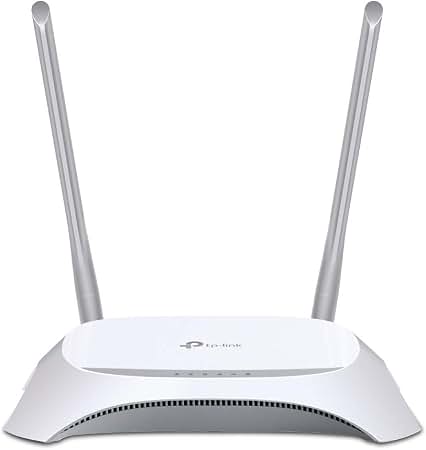
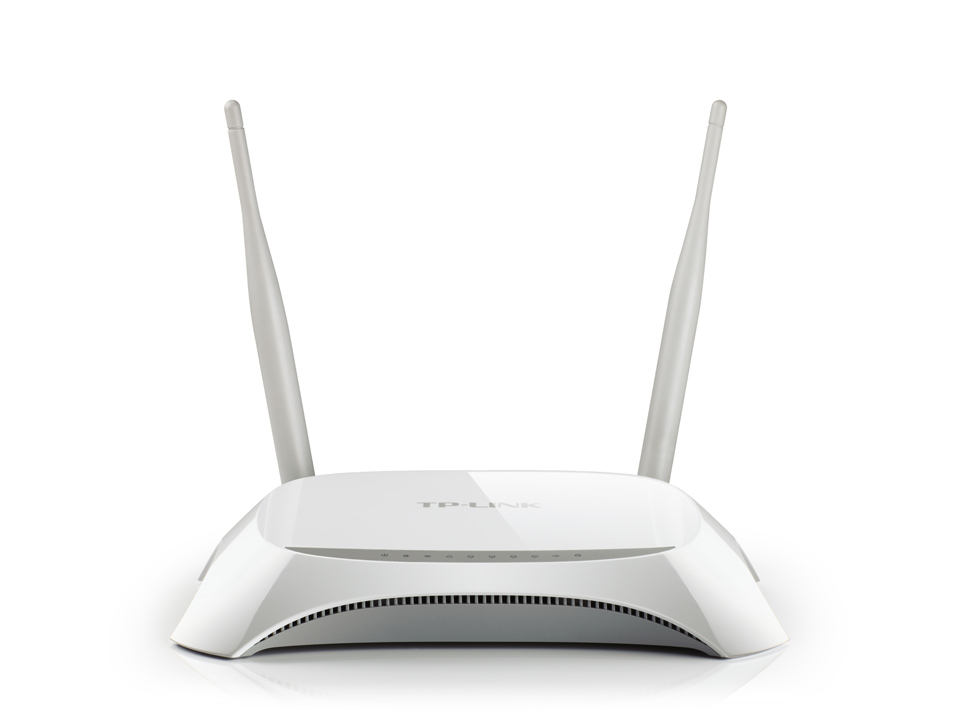
TP-Link TL-MR3420 300Mbps 3G/4G Wireless N Router 4-Port USB 2.0
Original price was: KSh 4,400.00.KSh 3,400.00Current price is: KSh 3,400.00. ex VAT
TP-Link TL-MR3420 300Mbps 3G/4G Wireless N Router 4-Port USB 2.0
| Model | TL-MR3420 |
| Device Type | 3G/4G wireless N router |
| Interface | 1x USB 2.0 modem port, 1x 10/100 WAN, 4x 10/100 LAN |
| Wireless Standard | 802.11b/g/n |
| Frequency | 2.4–2.4835 GHz |
| Wireless Speed | Up to 300 Mbps |
| Antenna | 2x 5 dBi detachable, reverse SMA |
| MIMO | 2T2R |
| Power Supply | 12 VDC / 1 A |
| Dimensions | 204 x 138 x 44 mm |
Same day Delivery
Delivery

We deliver to the address you provide. Nairobi is often same-day on business days.
Across the country
Delivery outside CBD starts from KES 300
Warranty 1 year

72-hour (3-day) returns

Description
Mobile Broadband to Wi-Fi Router
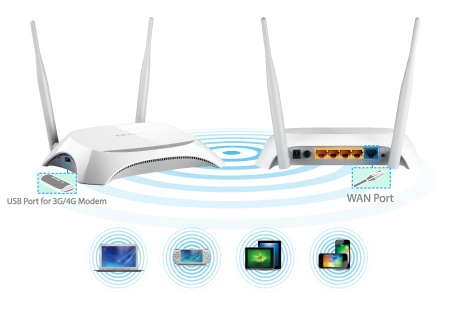
The TP-Link TL-MR3420 is a 300 Mbps wireless N router that accepts a 3G or 4G USB modem on its USB 2.0 port. It shares that mobile link over 2.4 GHz Wi-Fi or four 10/100 Mbps LAN ports. A dedicated WAN port provides failover to a wired uplink.
The USB 2.0 socket supports LTE, HSPA+, HSUPA, HSDPA, UMTS and EVDO modems. Two detachable 5 dBi antennas run 2T2R MIMO on the 2.4 to 2.4835 GHz band. TP-Link rates the radio for up to 32 concurrent clients and 300 Mbps PHY throughput.
The chassis measures 204 x 138 x 44 mm and runs from a 12 VDC 1 A adapter. A WPS button, wireless on/off switch and power switch sit on the rear panel. IGMP proxy and snooping carry IPTV multicast streams, while bandwidth control caps throughput per PC.
Key Features
USB 2.0 Modem Port
The router connects a 3G or 4G dongle and rebroadcasts the mobile link to wired and wireless clients.Automatic WAN Failover
- Selects 3G/4G or wired WAN as the primary uplink
- Switches to the secondary path when the primary drops
- Keeps the internet session active without manual reconfiguration
2×2 MIMO Radio
Two 5 dBi detachable antennas provide 300 Mbps over the 2.4 GHz band for up to 32 devices.Four-Port LAN Switch
Four 10/100 Mbps LAN ports support auto-negotiation and auto-MDI/MDIX for straight or crossover cabling.Bandwidth Control
Administrators assign a throughput ceiling to each client to stop single users saturating the mobile link.Tether App Management
The Tether app for Android and iOS exposes parental controls, access control and firmware updates.
Specifications
| Feature | Specification |
|---|---|
| Model | TL-MR3420 |
| Device type | 3G/4G wireless N router |
| Interface | 1x USB 2.0 for LTE/HSPA+/HSUPA/HSDPA/UMTS/EVDO modem; 1x 10/100 Mbps WAN; 4x 10/100 Mbps LAN |
| Wireless standard | IEEE 802.11b, 802.11g, 802.11n |
| Frequency | 2.4–2.4835 GHz |
| Wireless speed | Up to 300 Mbps |
| Antenna | 2x 5 dBi detachable, reverse SMA |
| MIMO configuration | 2T2R |
| Transmit power | < 20 dBm |
| Wireless security | 64/128-bit WEP, WPA-PSK/WPA2-PSK, MAC filtering |
| Firewall | NAT, SPI, MAC/IP/Packet/Application/URL filtering, DoS, SYN flooding, Ping of Death |
| Management | Web-based HTTP configuration, firmware upgrade, Tether app |
| Buttons | WPS/Reset, wireless on/off, power on/off |
| Power supply | 12 VDC / 1 A external adapter |
| Dimensions | 204 x 138 x 44 mm |
| Operating temperature | 0 °C to 40 °C |
| Operating humidity | 10% to 90% non-condensing |
| Certification | CE, FCC, RoHS |
| System requirements | Windows 98SE/NT/2000/XP/Vista/7/8/10, macOS, NetWare, UNIX, Linux |
What’s in the Box
TL-MR3420 3G/4G wireless N router
2 detachable antennas
12 VDC 1 A power supply unit
Ethernet cable
Resource CD and quick installation guide
Why Choose the TL-MR3420
The USB modem port converts a mobile data dongle into a shared hotspot for branch offices and site cabins.
Automatic uplink failover keeps point-of-sale and CCTV links running when the primary line drops.
Per-client bandwidth limits prevent one workstation from consuming the entire cellular allowance.
Detachable 5 dBi antennas allow placement adjustments where the modem signal is weak.
Web and app management remove the need for a dedicated network administrator on small sites.




Martin Barasa (verified owner) –
Does the job for basic browsing and WhatsApp calls. Range is limited and the plastic housing feels light, but for a small office setup it is fine.
Jane Njoroge (verified owner) –
Set it up in our rural home where there is no fibre and it works well with a 4G modem. The web interface is straightforward and the USB port keeps the dongle charged.
Paul Ochieng (verified owner) –
Works fine but the 2.4GHz band can get crowded in an apartment block. Signal drops in the far bedroom. Consider a higher-tier model if you have a big house.
Brenda Wanjala (verified owner) –
We use it at our shop in Kitengela as a backup when the fibre goes down. The 4 LAN ports connect our POS and printer without a separate switch. Failover to the 3G dongle is manual but the setup took less than ten minutes. Solid piece of kit for the price.
Isaac Kimani (verified owner) –
Plugged my Safaricom dongle into the USB port and had Wi-Fi in the house within minutes. The 300Mbps wireless is plenty for a small family.